Operations
Collaborator access
Connect Shopify Partners and provide the session cookie used for collaborator requests.
This page shows you how to connect Shopify Partners in Relay and where to find the one cookie Relay needs for collaborator access requests.
Minimum requirements
- At least one Relay app already created
- Your Shopify Partner Organization ID
- The Shopify Partners session token, if Relay should request collaborator access for you
Connect the partner account
Go to Settings → Partners.
Add:
- Partner Organization ID
- the app or apps this partner account should manage
One app can belong to only one partner account.
Where to copy the cookie from
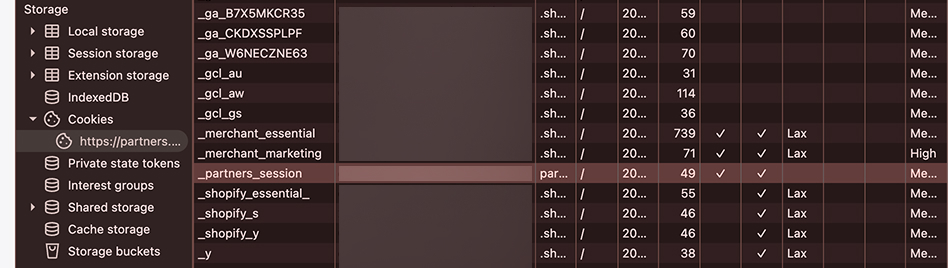
The session token Relay expects is the Shopify Partners cookie named _partners_session.
Copy it from:
- Open
partners.shopify.comwhile signed in. - Open browser DevTools.
- Go to
Application. - Go to
Cookies. - Select
partners.shopify.com. - Copy the value of
_partners_session.
Paste only that value into Settings → Partners → Session token.
Relay treats this token as optional unless you want collaborator access requests.
Associate apps and defaults
After the partner account is connected:
- Select which Relay apps this partner account owns.
- Open
Default accessfor each app if you want preset collaborator permissions. - Optionally save a default request message.
Notes
- If the session token expires, update it in the same Settings → Partners screen.
- The current UI copy treats the token as valid for about one year.